

Why manual invoicing Is becoming a risk for chemical distributors
For chemical distributors, invoicing affects order fulfilment and cash flow. Each invoice must reflect the agreed product, quantity, price and payment terms. When teams manage these details manually across spreadsheets, emails and separate records, errors become more likely as the business grows. Manual invoicing can also delay payment follow-up and make it harder to see which customers still owe money. Invoicing software for chemical distributors can connect invoices to orders and make payment information easier to track.
Where manual invoicing creates problems
- Invoice errors and repeated work
Sales teams may confirm orders in one document while finance teams prepare invoices from another. If the quantity, price or customer details have changed, the invoice may not reflect the final agreement.
These discrepancies can lead to corrections, delayed approvals and extra communication with customers. Re-entering the same information across several systems also takes time away from reviewing outstanding payments.
- Delayed payment follow-up
Sending an invoice does not guarantee that payment will arrive on time. Your team needs to know when each invoice was issued, when payment is due and whether the customer has paid.
When this information sits across email threads and spreadsheets, an overdue invoice may go unnoticed. Two team members may also contact the same customer without knowing that payment has already been received.
- Limited visibility into accounts receivable
Accounts receivable is the money customers owe for goods or services already supplied. An accurate view of these outstanding amounts helps you plan cash flow and make informed purchasing decisions.
Manual records make it harder to identify overdue balances and unpaid invoices, especially when several salespeople serve the same customers or your business operates across multiple locations.
What should invoicing software for chemical distributors do?
The right system should support how you process orders and collect payments, rather than simply replacing paper invoices with digital documents.
- Connect orders to invoices
An integrated order-to-invoice workflow uses confirmed order information to generate invoices. This reduces repeated data entry and helps your sales and finance teams work from the same product, quantity and pricing details. This is particularly useful when customers order different grades, pack sizes or quantities of raw materials and ingredients.
- Make payment status easier to track
B2B invoicing software should show issued invoices, outstanding balances and payments received. When invoice and payment records are connected, your finance team can identify unpaid invoices and prioritise follow-up. Better visibility does not guarantee faster payment. Customers may still have their own approval processes and agreed credit terms, but a connected system helps you manage these obligations consistently.
- Keep customer records organised
Accurate customer records support consistent billing. Your team should be able to reference the correct customer details and agreed commercial terms when processing repeat orders.
A connected system also reduces the need to search through separate files to review a customer’s invoicing history.
How Orbital supports invoicing workflows
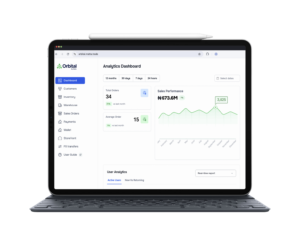
Orbital by Matta connects invoicing with order and payment activity. Its invoicing feature generates invoices directly from orders, synchronises them with payments and tracks their status in real time.
See how invoicing works on Orbital and explore a more connected approach to managing orders, invoices and payments.


Study Abroad, New Journey To Try On
Lorem ipsum dolor sit amet, consectetur adipiscing elit, sed do eiusmod tempor incididunt ut labore
From Quote to Order: How Suppliers Can Convert More B2B Quote Requests
A B2B quote request signals genuine buying intent, but turning that interest into a confirmed order

How to Prevent Overselling Across Multiple Warehouses and Sales Channels for Chemical Suppliers
Overselling across multiple warehouses and sales channels happens when a business accepts an order f
Leave a Reply